
| Manish Shetty | Networks, Cybersecurity, Technology
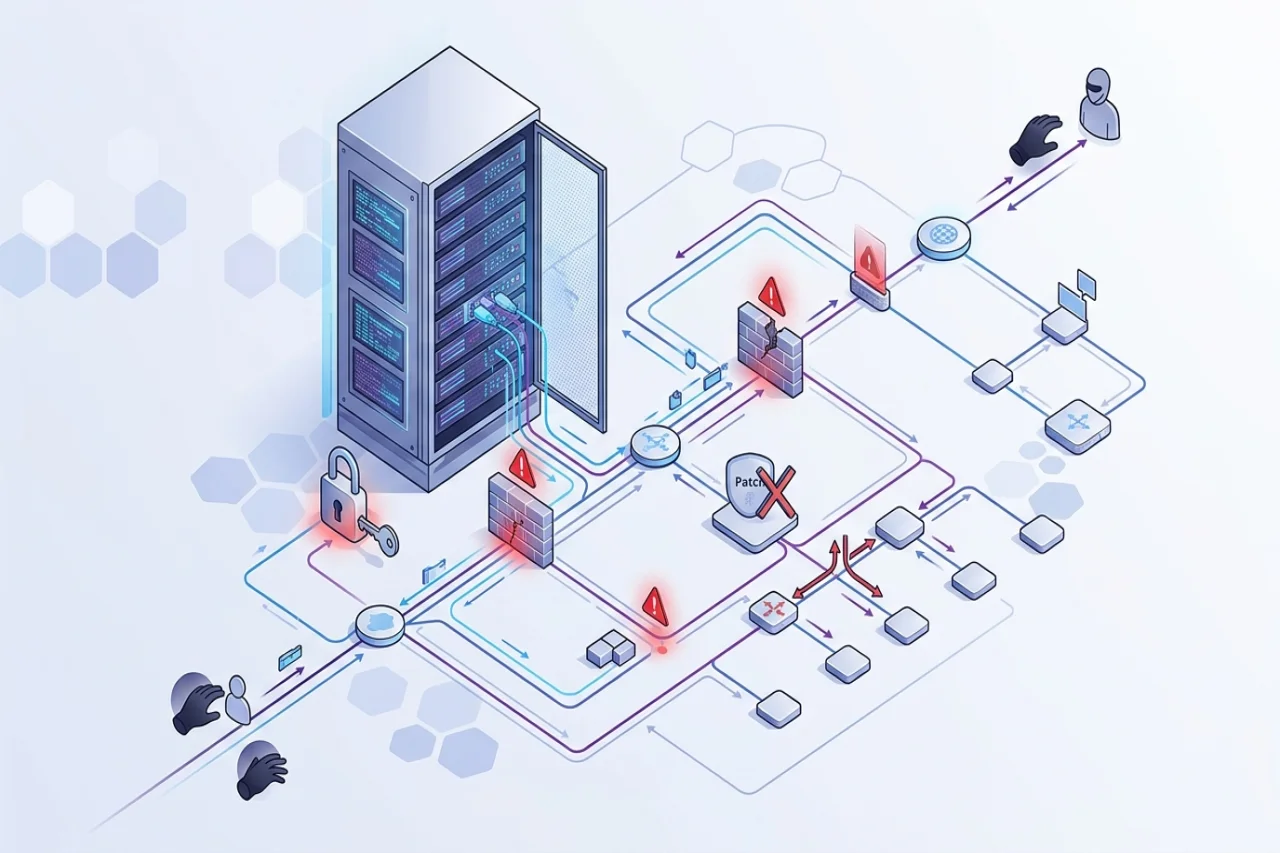
An attacker can discover information about a company’s remote access service available online. If an employee’s credentials are compromised, the intruder gains access to the programs and systems the employee uses, which in many cases do not correspond to their official needs. The list of factors contributing to the security breach appeared to be quite long. This happens because there was a combination of several security holes, each of which may seem insignificant on its own. This article examines the specific network security gaps that attackers can exploit to gain access to a company’s network, analyzes how these breaches can be combined, and outlines ways to detect and prevent such security incidents.
What Makes a Network Weakness Exploitable?
A weakness is something that could make a system easier to compromise, such as an outdated VPN device. An exposure means someone can reach that system, perhaps from the internet. An attack is an attempt to use the weakness to gain access or cause harm. These terms describe different parts of the same risk.
Consider an open port. An open port is a connection to a listening service. A public website will have open ports as services; therefore, an open port is not always a weakness. It depends on which service is listening on the open port, whether the service is hardened, and who has access to it.
Attackers search for accessible systems because they can test them without first entering the network. Common network vulnerabilities become more concerning when they affect an internet-facing service or a system that leads to sensitive data. The same flaw on an isolated device may present a different level of risk.
A useful review therefore goes beyond counting open ports and services. It asks what each one does, whether it is needed, who can use it, and what could happen if someone gained access to it.
Common Network Security Weaknesses and How Attackers Use Them
Each example below covers the weakness, a way it could be exploited, and a practical fix. Some gaps provide an entry point; others give an attacker more options after getting inside.
Unpatched Software and Outdated Network Devices
Servers, VPNs, firewalls, and routers run software that needs maintenance. If an internet-facing device has a known flaw, an attacker may exploit it before anyone signs in. Unpatched software vulnerabilities need especially quick attention when there is evidence that attackers are already using them.
A firm can continue using an old virtual private network (VPN) appliance if its employees can benefit from it. However, if the equipment is no longer supported, the organization will be helpless when critical flaws appear. It is necessary to create a list of the equipment and programs used in the firm and update the security programs on the devices and operating systems. Additionally, the corporation should plan to replace the obsolete tools and equipment.
Misconfigured Firewalls and Exposed Services
Sometimes a firewall is configured to allow all networks, while access should be given only to a few staff members. As a result, many administrative pages or remote-access desktops are available to everyone via the Internet.
An exposed remote desktop service, for example, gives an attacker a place to try stolen login details. Review each access rule against a current business need. Remove unused services, and restrict necessary ones to approved people or networks. Some network security misconfigurations are old setup choices that were never reviewed after a project changed.
Weak Passwords, Default Credentials, and Missing MFA
A guessed password is a password that is guessed by an attacker. A stolen password is a password that is compromised in another way, such as through a fake login page or another source. Weak passwords are easier to guess, whereas reusing the same password in different places gives the attacker more access points if they manage to find one.
Default login credentials on a router or some other device are another security risk. Make sure to change those during the initial configuration and use a different password for each device. Multi-factor authentication can add another layer of security to a password login. This usually involves another component needed to log in, such as a code sent to a phone.
Poorly Secured Remote Access
VPN, remote desktop, and SSH connections allow authorized people to work from elsewhere. They can also offer an attacker a direct route into internal systems. That makes exposed remote access services worth checking separately from ordinary internal applications.
Limit access to only people who need it, make sure remote access software is kept up to date, require multi-factor authentication for any remote access, and monitor login activity. Investigate any repeated failed login attempts and successful logins that occur at unusual times.
Flat Networks and Weak Segmentation
On a flat network, many devices can connect to one another without a work-related reason. If an employee's laptop is compromised, an attacker may then attempt to access a file server. This movement from one system toward another is called lateral movement.
What an Attacker Could Reach
A laptop workstation may need to communicate with a shared application, but that does not mean that it needs access to every single server in the application’s infrastructure. Network segmentation allows for restrictions to be placed on systems that share a network segment.
Subnetting helps organize those groups, though learning how to subnet is only one part of controlling which systems can communicate; it can help limit the ability of a rogue system on one segment to move laterally and access other systems that share that segment.
Insecure Protocols and Unprotected Traffic
Some older methods of managing devices or transferring files do not sufficiently protect the information that is being sent or received. Vulnerable network protocols might leak passwords or data to someone who can observe that connection. Where possible, use encrypted variants, and pay attention to certificate settings: an encrypted channel provides little security benefit if the system trusts an invalid certificate, for example by accepting it without confirming what service it was issued for.
Phishing and Excessive Access Permissions
Phishing attacks can trick someone into entering a password on a false login page. What happens next depends partly on the account’s permissions. An account with access far beyond its job gives an attacker more places to go.
Only provide the access the user needs for the job, and review this as their responsibilities change. In the case of a phishing attack, investigate the employee's role, but also review the login rules and permissions.
How Several Small Gaps Become One Serious Incident
The following example is one hypothetical case; this example demonstrates how weaknesses may be correlated; it does not imply that all attacks follow this pattern.
- An attacker locates a reachable VPN (virtual private network) service: Staff need remote access to this service, but the service is also accessible on the internet. An inventory and exposure review would enable the team to verify whether this exposure is required.
- A stolen password works because MFA is missing: The attacker signs in using a password obtained elsewhere. Requiring MFA could interrupt the attempt even though the password is correct.
- The account has too much access: It can reach shared folders and tools unrelated to the employee’s job. A permissions review could have limited what the attacker was able to see or use.
- The network permits too many internal connections: From that account, the attacker can try to reach additional systems. Network segmentation could block connections that the employee’s work does not require.
Each control interrupts a different part of the path. Teams do not need to predict an attacker’s exact next move to make progress. They can examine how someone might get from an exposed service to an important system, then remove unnecessary connections along the way.
That is a practical way to assess network security weaknesses. The most useful question is often not “How many findings are there?” but “Which findings could work together?”
How to Find and Prioritize Network Security Weaknesses
A long list of findings can be difficult to act on. Teams need to know what systems they have, which ones are exposed, and what an attacker could gain from each gap.
Identify Devices, Services, and Internet Exposure
Maintain an inventory of servers, networking devices, and remote access tools on which services are running, identifying who owns them and whether they should be internet-accessible.
Cross-reference this list with Internet-facing assets identified by scans, noting discrepancies such as an unaccounted administration interface or a virtual private network (VPN) concentrator without an owner. A system that is not properly inventoried can linger in an unknown state, leaving it open to compromise.
Prioritize the Findings That Create the Most Risk
Consider whether the system is exposed, whether attackers are known to exploit the flaw, how important the system is, and what access it could provide. An exposed firewall with an actively exploited flaw usually needs attention before a minor issue on an isolated device.
A vulnerability management process is much more effective if these differences influence the prioritization of remediation activities. Unpatched software vulnerabilities and network security configuration flaws should be evaluated in context, considering what can reach the target system and which systems an attacker can access after compromising it. Common network vulnerabilities are not always equal.
Confirm That Fixes Work
Once you have made changes, double-check the affected system to ensure that the change was successful. It should be possible to see a successful update in the system’s recorded version. A modified firewall rule should allow the intended connections and deny the unintended ones. The MFA should affect the accounts that it was intended to impact in some way.
Record Unresolved Exceptions
Sometimes a solution has to be deferred because a system is needed for a critical service, or a replacement is being readied. Note the reason, the owner of the decision-making authority, any temporary restriction of access, and when it will be re-evaluated.
| Finding | Why it matters | First action | How to verify |
|---|---|---|---|
| Unpatched VPN | An exposed flaw may provide an entry point | Update it or restrict access until it can be fixed | Check its version and scan again |
| Broad firewall rule | More people can reach a service than necessary | Limit access to approved sources | Review the rule and test access |
| Default device password | Someone may be able to sign in easily | Set a unique password | Confirm the old login no longer works |
| Unrestricted access between segments | An intruder may reach additional systems | Allow only required connections | Test that unwanted connections are blocked |
A Practical Checklist for Reducing Network Risk
A review is only as good as the changes it inspires. Focus on your systems from the outside in, and examine what an account or device could access if it gained access to your network.
- Patch vulnerable internet-facing devices, or replace them if support has ended.
- Remove unused services and narrow firewall rules to the access required.
- Change manufacturer-set passwords and require MFA for remote and administrator access.
- Reduce account permissions and limit connections between groups.
- Reduce the scope of permissions for the account and restrict what groups of systems connect to each other.
- Review the logs of login attempts and verify that all the security measures work.
Keep the list associated with the systems and specify responsible persons because “review remote access” is an incomplete task, whereas “checking the version of the software for the VPN and multifactor authentication this week” serves as a solid verification of some security measures.
Reducing network exposure could require multiple intermediate steps, each of which decreases the overall risk. Narrowing the scope of a particular access point reduces the impact of a breach, but it does not replace other security improvements, such as software updates. It is important to physically note both changes to avoid leaving either unimplemented.
Conclusion
An attacker does not necessarily need one spectacular problem to succeed. A combination of a vulnerable service, simple login, broad permissions, and open access to the network can also lead to a successful attack. To counter such an issue, it is critical to reduce network security threats by identifying exposed systems, eliminating the most dangerous weak points, and ensuring that the changes actually resolve the issues.
FAQ
Frequently Asked Questions
01What is the first network weakness a small team should check?
The first step is to discover all the systems available through the Internet. You can scan these systems for known vulnerabilities and poor access controls, especially on remote and administrator logins. Then you must prioritize the findings from your survey, taking context into consideration: A compromised, outdated system exposed to the Internet may be more important than an equivalent problem on an isolated server.
02Does closing open ports make a network secure?
Closing down the ports that are not in use is the first step in reducing the attack surface of the network. Available services must still be updated, kept tight, secured, and monitored. A necessary open port may be controlled, but an unnecessary open port has no value to the business and should be closed.
03How often should network weaknesses be reviewed?
Reviews should happen regularly and after major changes, such as adding remote access or connecting a new office. Teams should also check affected systems when significant vulnerabilities are disclosed and review their controls after a security incident. The schedule should reflect how often the environment changes.
Author

Manish Shetty
0 Comments
Comments are moderated to keep the discussion useful and respectful. Spam, automated submissions, and low-value promotional comments are removed.
Leave a Comment